Solution Diagnostic About References Resources Our integrations Logistics Providers (3PL) Shippers Module - Transport Optimizer Freight invoice audit Module - WMS Module - OMS Module - Smart AI Files Converter Module - 3PL Client Portal Module - Shippers Portal Module - Capacity management Module - Equipment Start a diagnostic
🤖 Module - Smart AI Files Converter

WMS ERP: automate your order processing with AI

Stockbooking's Smart AI Files Converter automates the processing of customer orders and advance shipping notices received as files. Using artificial intelligence, it reads the documents, extracts and validates the relevant data, then automates your WMS ERP integration: into Stockbooking or into your existing software, depending on the connection options available.

PDFs, images, Excel files or information sent via WhatsApp: your teams no longer have to systematically re-key the data contained in each document. You reduce manual handling, limit data entry errors and speed up the processing of your logistics flows, without having to replace your management software.

WMS and ERP: what is the difference?

In short: the ERP runs the business, the WMS runs the warehouse. The ERP knows what has been sold, purchased and invoiced; the WMS knows where each item is and how to receive, store, pick and ship it. The two systems are complementary and exchange data continuously.

An ERP (Enterprise Resource Planning) system centralizes the company's management processes: sales, purchasing, invoicing, accounting. It knows how much of an item is available, but not exactly where it is stored in the warehouse.

A WMS (Warehouse Management System) manages physical operations: receiving, storage, picking and shipping. It tracks each item down to its location, with its batches, expiry dates or serial numbers.

CriterionERPWMS
Main roleBusiness managementWarehouse operations management
Question it answersWhat do we sell, buy and invoice?Where is the stock and how should it be handled?
UsersSales, purchasing, finance and administration teamsLogistics managers, team leaders and operators
Main dataSales orders, purchasing, invoicingReceipts, stock, locations, picking and shipments
Stock detail levelOverall quantity per item and per siteStock per location, batch, expiry date or serial number

WMS ERP integration: what data is exchanged?

A WMS ERP integration keeps both systems in sync: each one sends the other the information it needs to work.

From the ERP to the WMS

  • Item master data
  • Customer orders to be picked
  • Purchase orders, which become advance shipping notices

From the WMS to the ERP

  • Confirmed receipts, with any discrepancies
  • Completed shipments, to trigger invoicing
  • Updated stock levels

One link often remains manual, though: even when the ERP and the WMS communicate with each other, documents received by email, PDF, Excel or WhatsApp still need to be re-keyed. This is exactly where the Smart AI Files Converter steps in: it extracts data from incoming documents to automate its integration into the target system.

ERP, WMS, TMS: who does what?

A TMS (Transport Management System) is dedicated to managing transport: organizing shipments, managing carriers, tracking deliveries and analyzing performance.

The ERP centralizes management processes, the WMS manages warehouse operations and the TMS handles transport flows.

WMS TMS integration: coordinating warehouse and transport

The WMS and the TMS hand over to each other at the time of shipping. The WMS knows what is leaving, in what quantity and in what packaging; the TMS knows how, by whom and when the goods will be delivered. A WMS TMS integration avoids re-keying shipping information from one tool to the other.

From the WMS to the TMS

  • Orders ready to ship
  • The number of parcels or pallets, their weight and volume
  • Delivery addresses and receiving constraints

From the TMS to the WMS

  • The selected carrier and mode of transport
  • Labels and transport documents
  • Tracking numbers and pickup times

Take a customer order as an example. It is recorded in the ERP, then sent to the WMS, which organizes picking. Once the parcels are ready, the TMS selects the carrier and schedules the pickup. Shipping information is then sent back to the ERP to trigger invoicing. At each step, incorrect or manually re-keyed data can delay the whole chain.

The WMS TMS pair also plays a role in dock organization: by knowing the volumes to be shipped in advance, the warehouse can plan its loading and the carrier can adjust its resources.

In an environment combining ERP, WMS and TMS, the quality of the data exchanged is essential. The Smart AI Files Converter complements these tools by automating the reading of the files that feed logistics processes, without replacing their functionality.

Smart AI Files Converter: automate your order processing

In many warehouses, part of the administrative work still consists of retrieving information from documents and then copying it into management software.

An order arrives as a PDF by email, a supplier sends a photo or a customer sends their information via WhatsApp. Teams have to open the files, identify the item references and quantities, then enter the data into the system.

The Smart AI Files Converter automates this step using artificial intelligence. It turns the information contained in incoming files into data the target system can use.

The module addresses two needs in particular:

How does the Smart AI Files Converter work?

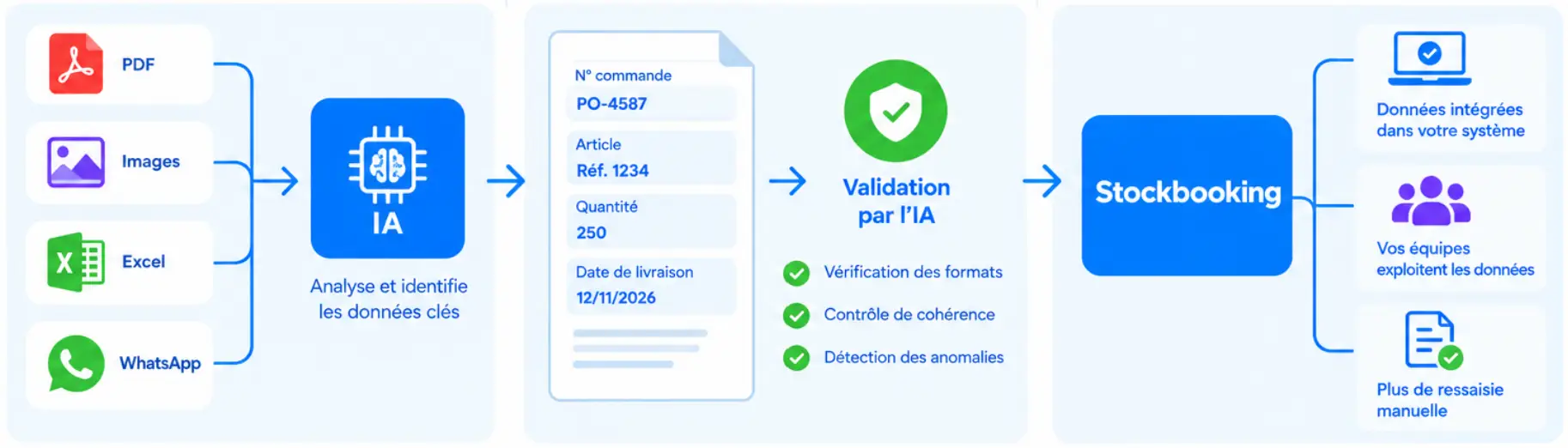
WMS ERP diagram: orders and advance shipping notices read by AI and integrated automatically

1. AI reads incoming documents

The module analyzes the files received, including PDFs, images and Excel files, as well as information sent via WhatsApp. It identifies the data needed to process the order or the receipt.

2. Data is extracted and validated

Artificial intelligence extracts the relevant information and submits it to a validation process. This step aims to limit errors caused by manual transcription and copy-pasting.

3. Data is integrated into your system

The processed information is integrated into Stockbooking or into another compatible system, depending on the defined integration scope. Teams can then use the data without systematically re-keying the content of the documents.

Automate orders, even without EDI

EDI, or electronic data interchange, allows computer systems to exchange information in structured formats. However, not all customers and suppliers have an EDI connection with their logistics partners.

The Smart AI Files Converter lets you process information received as files, including when the documents do not come from a standard EDI flow.

You can therefore automate part of your order processing without systematically requiring your partners to change the way they send information.

The benefits of automating order processing

Processing documents manually creates an administrative workload that grows with order volumes and the variety of formats received. A logistics diagnostic helps identify the flows where automation will have the most impact.

The Smart AI Files Converter lets you act on four performance levers.

Save time

Automated file reading reduces the handling needed to integrate data. Your staff spend less time opening documents, looking for information and re-keying item references or quantities.

Reduce data entry errors

Re-keying and copy-pasting can lead to transcription errors. AI-based data extraction and validation aim to limit these risks and the corrections they can lead to.

Free your teams from administrative tasks

The time spent on repetitive tasks can be reinvested in higher-value work: order follow-up, exception management, operations coordination and customer relations.

Speed up processing times and improve productivity

By reducing manual steps, you make the administrative processing of orders and advance shipping notices easier. Your organization can then better absorb fluctuations in volume and make better use of its resources.

Baxster Logistics: 2 hours saved per day during peak periods

Nébil Othmani, CEO of Baxster Logistics
Nébil Othmani CEO, Baxster Logistics

The experience of Nébil Othmani, CEO of Baxster Logistics, gives a concrete illustration of the benefits of automation.

His feedback reports:

These results illustrate the potential of automation when teams have to process large numbers of documents. Gains naturally depend on volumes, the formats received and the existing organization.

WMS ERP integration: compatible with your WMS and your ERP

Are you already using business management software or a warehouse management system? The Smart AI Files Converter is designed to complement your IT environment, not to replace your existing tools.

The module can integrate data into Stockbooking or into another compatible WMS or ERP. The feasibility and connection methods must be checked according to the target software and the interfaces available.

The aim is to automate the document flows that still require manual intervention, while preserving the functions provided by your management software. To choose tools suited to your business, read our guide to logistics software for SMEs.

A WMS solution adapted to your IT environment

Stockbooking is part of an ecosystem of logistics and management solutions including AKEAD, Sage, Easy WMS, Logistics WMS, Protech WMS, Corax, IzyPro and Satelix, as well as Shopify and PrestaShop for e-commerce flows.

The Smart AI Files Converter is designed to integrate data into Stockbooking or into another compatible system. Actual compatibility must be confirmed according to your environment and the integration methods required.

Whether you are looking for a WMS solution, a WMS designed for SMEs or better integration between your software, the challenge is to make information available without multiplying manual interventions.

For shippers and logistics service providers (3PL)

For manufacturers, distributors and e-merchants, automation makes it easier to process orders received through different channels.

For logistics service providers (3PL), it reduces the manual operations linked to the documents sent by their customers, especially when formats and practices differ from one client to another.

In both cases, the Smart AI Files Converter complements the existing IT environment by automating the integration of the data contained in incoming files.

Frequently asked questions about WMS ERP integration

What file formats can the Smart AI Files Converter read?

The module is designed to process different document formats, including PDFs, images, Excel files and information sent via WhatsApp. It extracts the data relevant to customer orders and advance shipping notices so that the target system can use it. Specific formats must be confirmed based on the documents used.

Do you need EDI to automate order integration into a WMS or ERP?

No. The Smart AI Files Converter lets you process information received as files, without systematically requiring an EDI flow. AI reads the documents and extracts the data needed for their integration. This approach makes it possible to automate certain flows even when customers or suppliers do not have an EDI connection.

Does the Smart AI Files Converter work with a WMS or ERP other than Stockbooking?

The module is designed to integrate data into Stockbooking or into another WMS or ERP. Compatibility depends on the target software, the interfaces available and the integration methods. A preliminary analysis makes it possible to check the feasibility of the connection and define the project scope.

How does AI check the extracted data?

Artificial intelligence extracts the information contained in the documents and submits it to a validation process before integration. This approach aims to limit transcription errors and manual re-keying. The checks applied depend on the nature of the documents and the process defined for your organization.

How long does it take to set up the Smart AI Files Converter?

The lead time depends in particular on the file formats, volumes, target software and integration methods. A study of your flows makes it possible to identify the operations that can be automated and define a realistic scope. Stockbooking can therefore help you assess your needs before determining the deployment steps.

Automate your document flows with Stockbooking

The Smart AI Files Converter turns incoming documents into usable data and automates your WMS ERP integration with your existing tools.

Reduce administrative tasks, limit data entry errors and free up time for your logistics operations, without calling your entire IT environment into question.